
Interface Overview
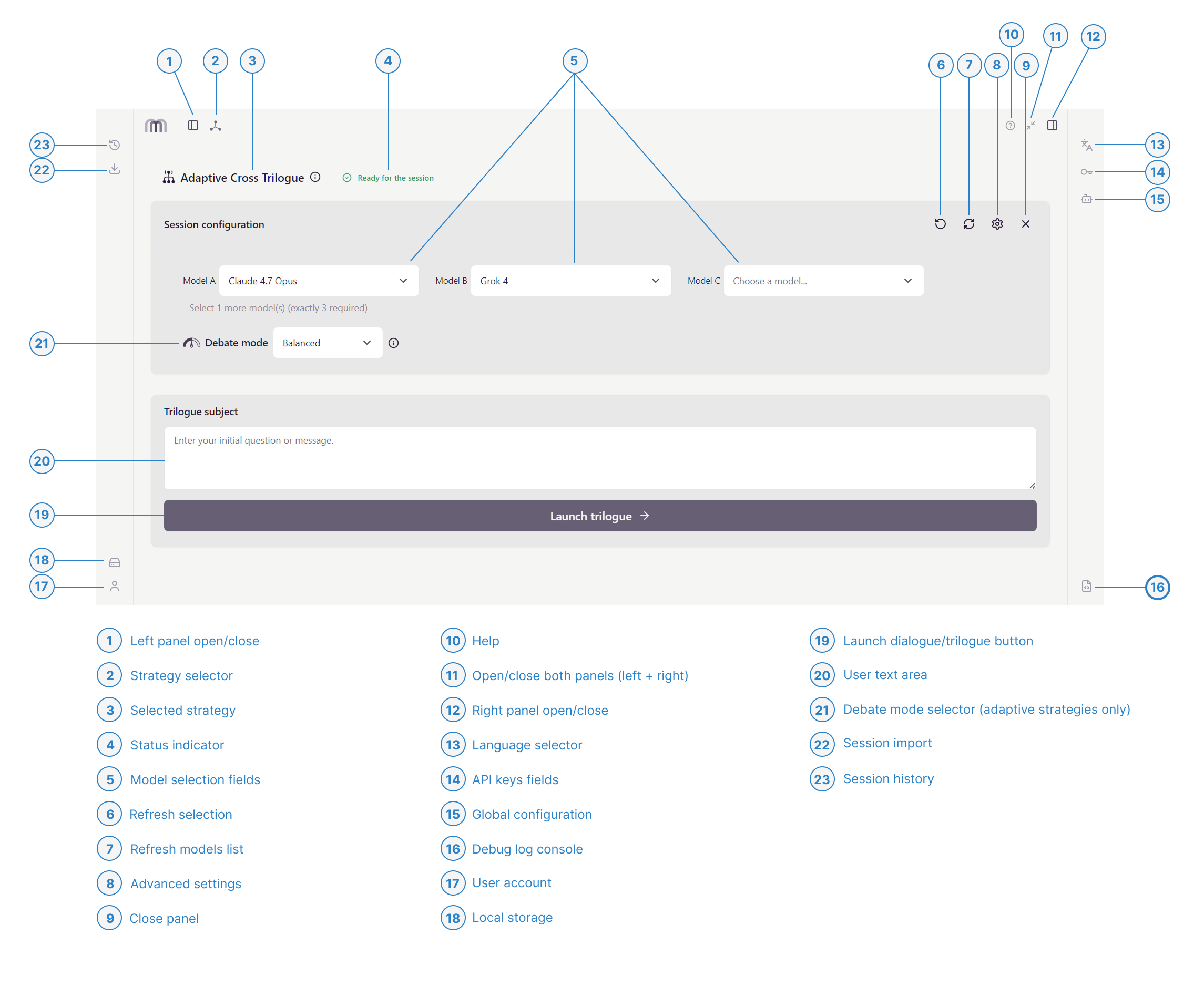
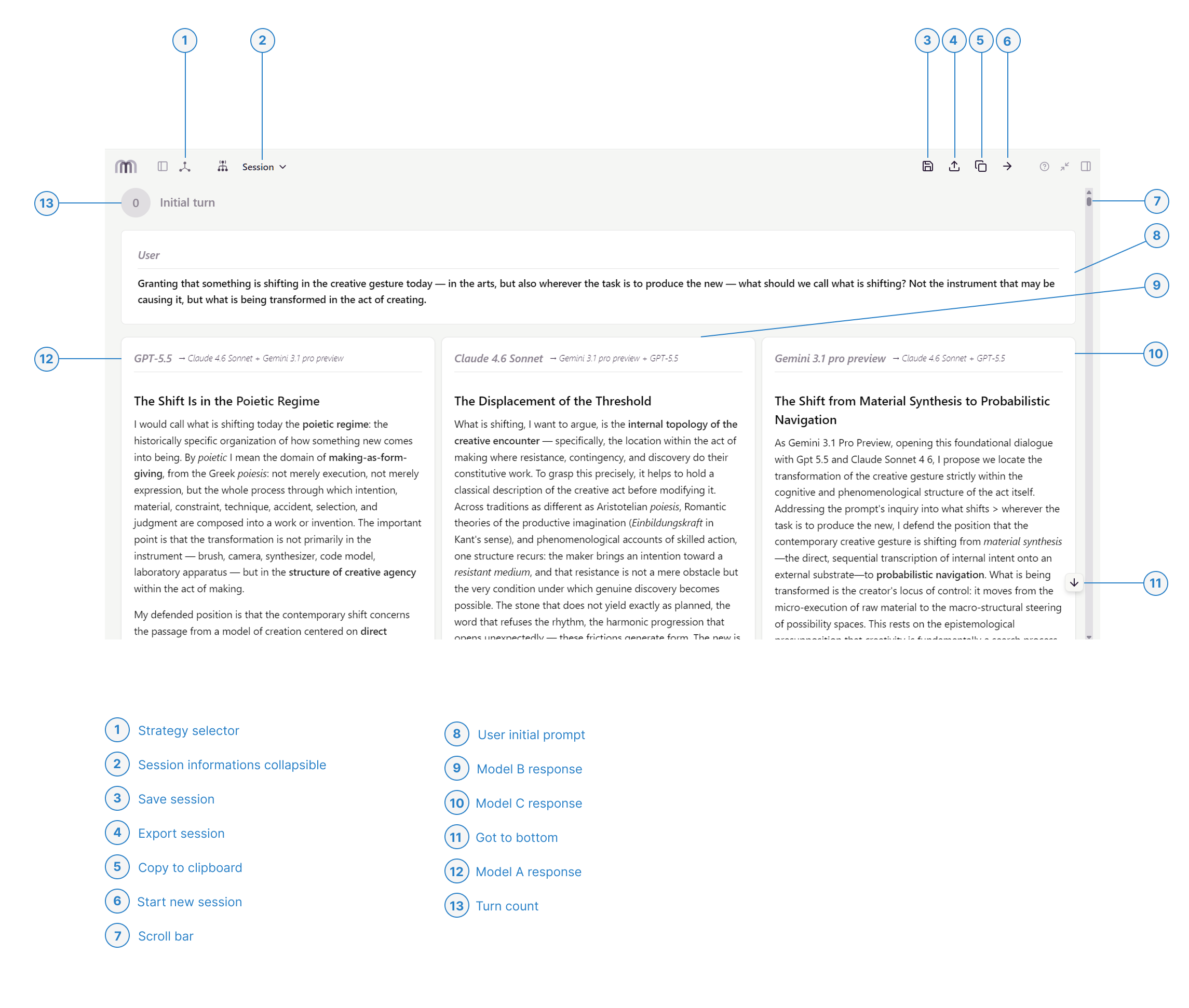
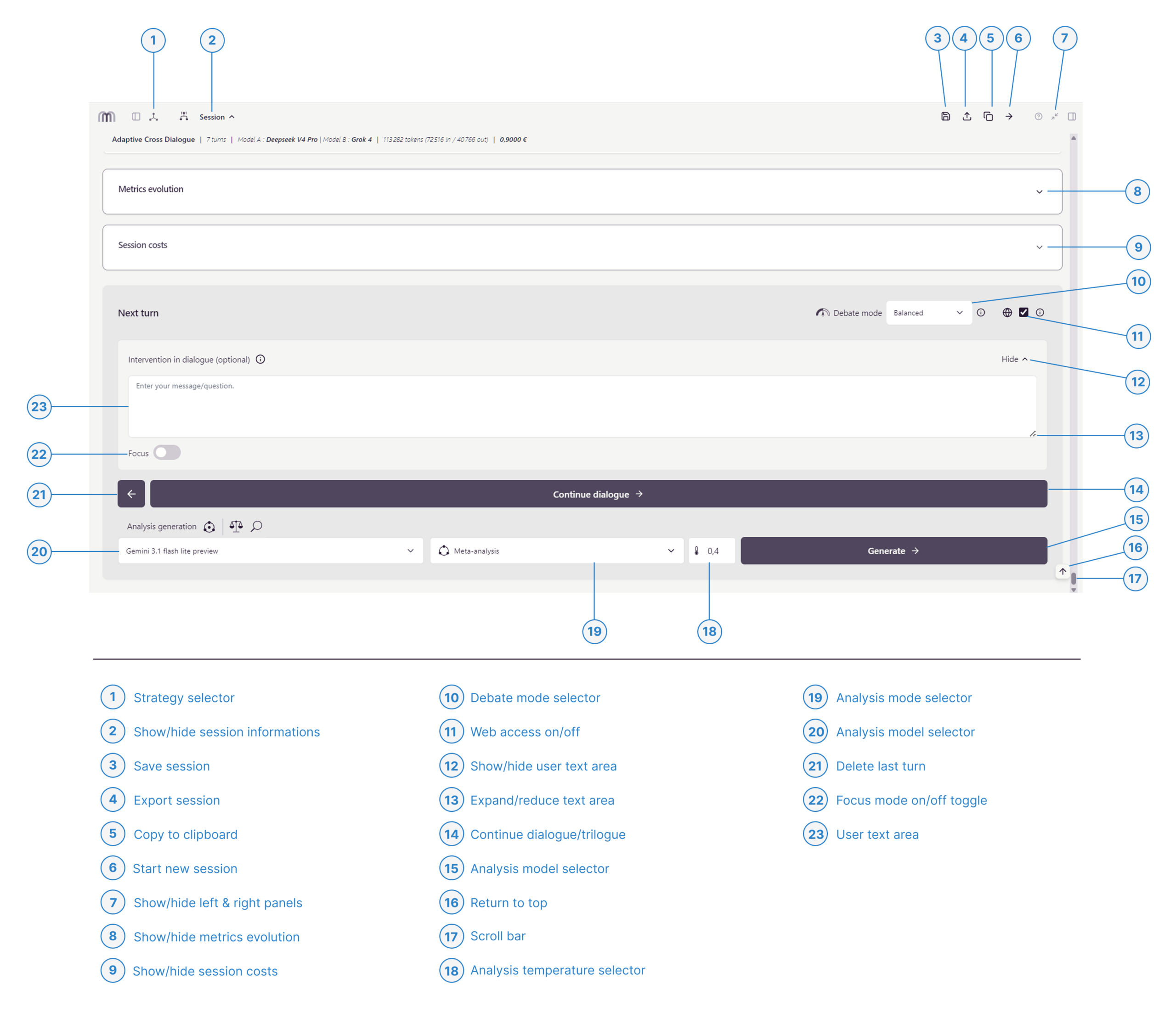
An overview of the main views and key functions. Click any section to jump directly to it.
1. Session Configuration View
2. Session View (Top)
3. Session View (Bottom)
4. Advanced Settings View
5. Left Panel View
6. Right Panel View
1. Session Configuration View
2. Session View (Top)
3. Session View (Bottom)
4. Advanced Settings View
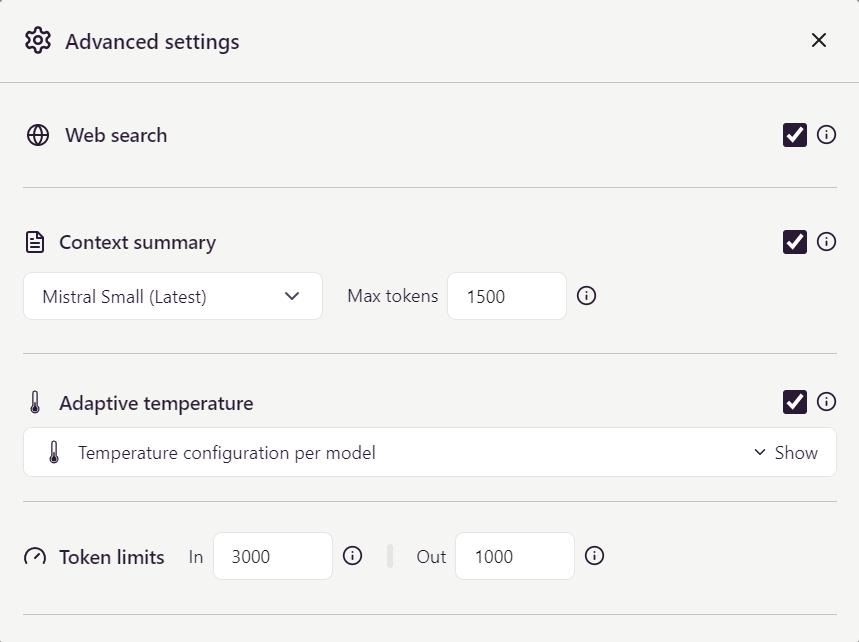
Web search: Enables real-time web access for models that support it. Useful when your topic requires up-to-date facts, references or recent events. Disabled by default to save tokens and reduce costs. A badge shows if web access is available.
Context summary: When enabled (recommended), Metamorfon periodically condenses the conversation history into a compact summary, so long sessions stay within model context limits without truncation. An economical model is chosen automatically from your configured providers.
Adaptive temperature: Automatically adjusts each model’s temperature according to the active debate mode — lower for analytical or convergent phases, higher for exploratory or divergent ones. Enabled by default. Disable this option if you prefer to define temperatures manually per model and mode in the section below.
Token limits: Sets per-turn input and output token limits, and caps context summaries at 800–2000 tokens to control costs and prevent overruns. Defaults are optimized for economy; increase them only for extensive context or detailed responses.
5. Left Panel View
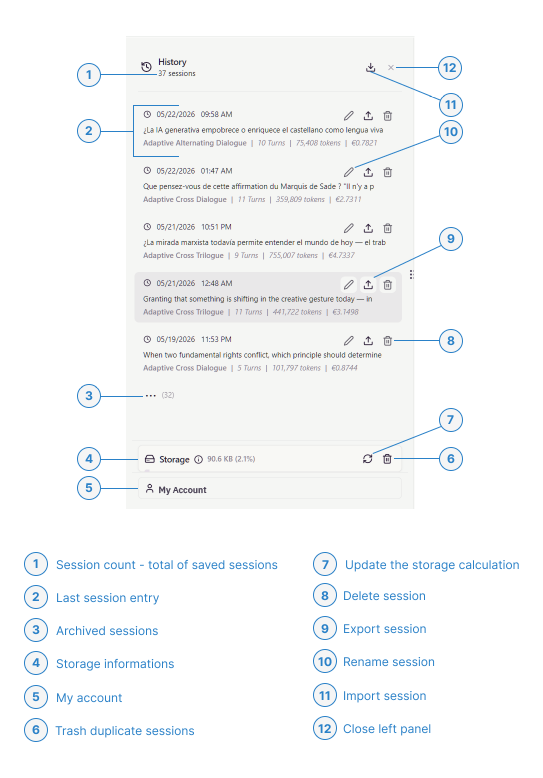
History – Where is my data stored?
All Metamorfon sessions are stored locally in your browser (IndexedDB). Your dialogues remain entirely private — never sent to any server — but they are also tied to the device and browser you used to create them. Clearing your browser data or switching computers will not bring back your history. To preserve sessions across devices or after a reset, export each one and re-import the resulting .json files later (see Session import and export below).
Can I reopen and continue a past session?
Yes. Clicking any entry reopens the corresponding session: every turn, analysis and context summary is restored as it was generated. From there, you can either read through the session offline or resume the dialogue — the original models, strategy and configuration are loaded automatically. The pencil icon lets you rename a session for easier retrieval; the change is purely cosmetic and does not affect its content, metrics or cost.
How is the cost per session calculated?
The amount next to each session (e.g. €0.78) is the cumulative API spend recorded throughout that dialogue, computed from each model’s input/output tokens and the provider’s pricing at the time. For Cross Dialogues and Trilogues, the costs of all models (A, B, C) are summed, along with analyses and context summaries. Once a session ends, its cost is fixed — later pricing changes do not affect historical entries.
Session import and export
Metamorfon supports per-session export and bulk import from the History panel. Each session can be exported via the upload icon next to its entry, in one of three formats:
- Markdown (.md) — clean, readable text, ideal for archiving or publishing.
- Word (.docx) — a formatted document for editing, annotation or sharing with non-Metamorfon users.
- JSON (.json) — the full raw data: prompts, responses, model settings, tokens, costs and analyses.
JSON is the only re-importable format, via the import icon at the top of the panel. Use it to migrate sessions between browsers or devices, or to restore your history after clearing local storage. Markdown and Word are read-only outputs and cannot be brought back into the app.
6. Right Panel View
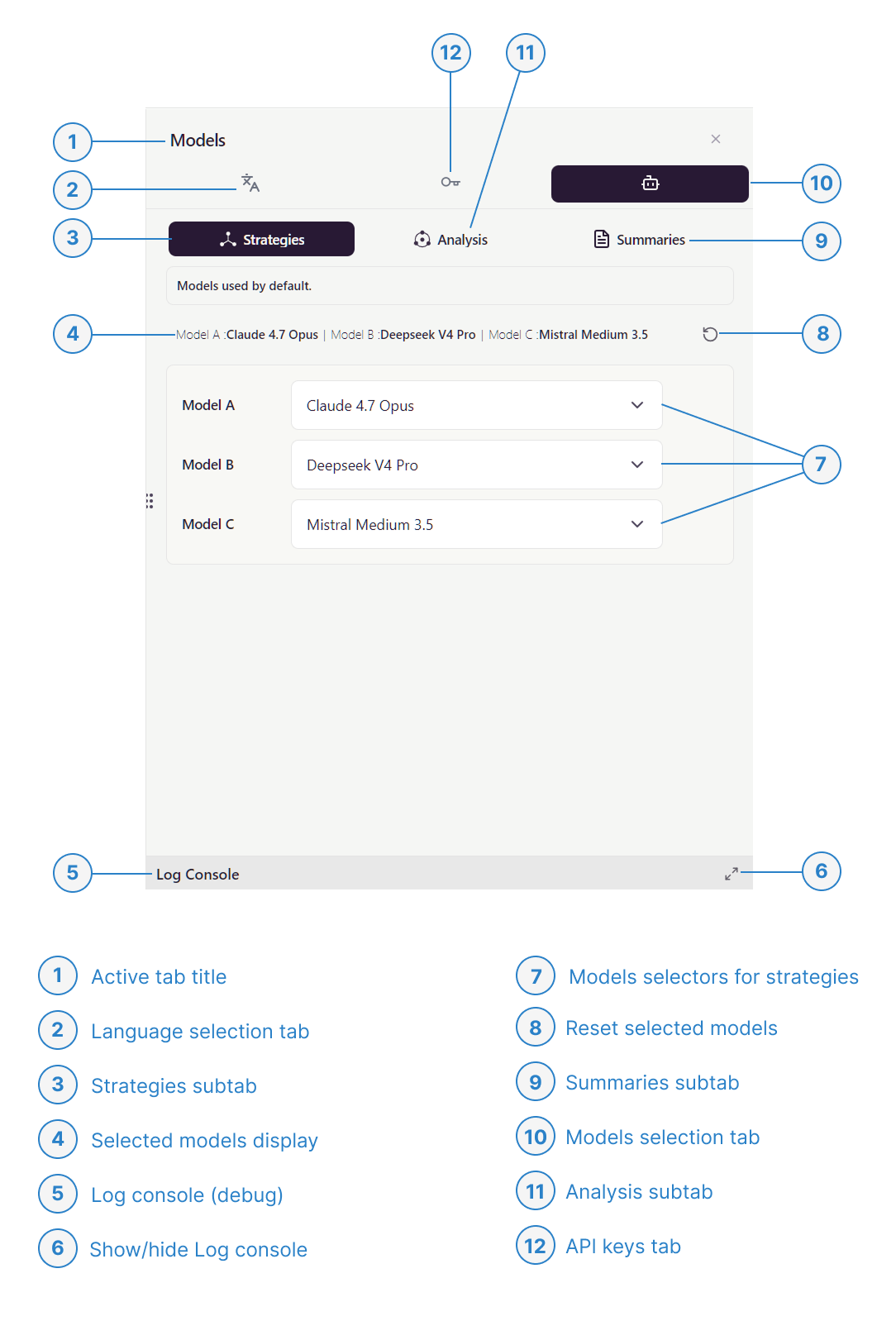
Interface and model language – (legend #2)
This tab selects Metamorfon’s working language. Your choice conditions both the interface language and the system instructions sent to the AI models, which in turn shape the language and style of their responses. To get the most consistent dialogues, pick the language you intend to converse in — even if you also understand the others.
API keys (legend #12)
Metamorfon connects to AI providers using your own keys (BYOK — Bring Your Own Key). All keys are stored locally on your device and never transmitted in clear text: they only leave your machine over secure HTTPS connections to the providers you have authorized (OpenAI, Anthropic, Google, etc.). Metamorfon’s own servers never see, log or relay them.
Default models (legend #10, currently shown)
This tab defines your global model preferences for three distinct roles: Strategies (the dialogue itself), Analysis (mid and post-dialogue analysis) and Summaries (context compression during long sessions). These defaults persist across sessions and app launches, so you set them once. Every new session can still override them locally from the strategy’s own configuration panel, without changing your saved defaults.